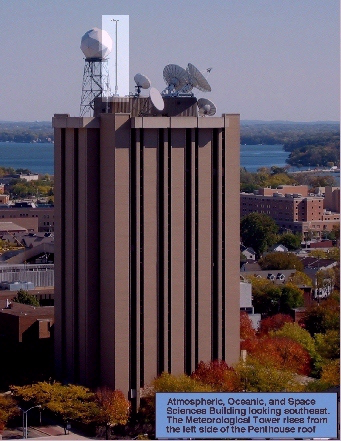
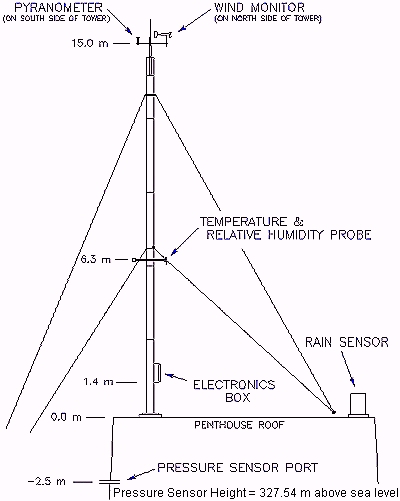
This instrument is located at the top of the Atmospheric, Oceanic and Space Science Building at the corner of Dayton and Orchard Street in the University of Wisconsin-Madison, WI (see picture to the right). It measures, in real-time:
This instrument and the online tools for accessing the data were developed by a collaboration of the following people/institutions:
Three windows will pop up:
This window is completely re-sizable to suit your needs; the meteorogram will be rescaled and relabelled as needed. You may also toggle parameters on/off (see "Controls", below).
As you move the mouse inside the graph, the date and time will appear at the top; if you drag the mouse, this will also appear, plus a green vertical reference line will follow the mouse until you release it, and values for each parameter (in both units) will appear either side of the green line. You may also tap the T key on your keyboard to toggle the display of temperature and dewpoint plots.
You may toggle meteorogram parameter subpanels on/off with this window, using the checkboxes along the top.
You also set the mode:
When not in realtime update mode, the program will continue to fetch data every two minutes, however, and when you return to "realtime mode" it will immediately display these data.
When not in use, just click the window's "Hide" button. When you want it back, then double-click anywhere on the Meteorogram re-display the Controls window.
Or use the button below if you will want to print the meteorogram. You will be asked to certify this applet as being allowed to run on your computer because printing is an otherwise forbidden activity. Otherwise, this is the only difference - unless you are using Internet Explorer version 5 with the Microsoft Virtual Machine (VM). In this case, please read the information below this button.
If you are using Internet Explorer with Microsoft's Virtual Machine (VM), we suggest that you immeidately update this with Sun's VM. Microsoft no longer supports their VM, and will in fact recommend you install Sun's. To do this, please visit this site and follow the instructions.
If you cannot update then you might try to enable printing in IE as follows: